> ## Documentation Index
> Fetch the complete documentation index at: https://lightdash-codex-prod-439-nested-repeated-columns.mintlify.site/llms.txt
> Use this file to discover all available pages before exploring further.
# Nested and repeated columns
> Define BigQuery STRUCT and ARRAY fields in the Lightdash semantic layer
Beta Available for BigQuery projects only and enabled per organization; ask Lightdash support to turn it on. [What Beta means](/support/feature-maturity-levels).
BigQuery columns can contain a non-repeated `STRUCT` (`RECORD`) or a repeated `ARRAY` of scalars or structs. Define their leaves with dotted column names in dbt YAML. Lightdash keeps non-repeated leaves on the model and exposes repeated columns as virtual tables joined with `UNNEST`.
Use [How column shapes map to fields](#how-column-shapes-map-to-fields) for a visual overview and [Define nested columns in YAML](#define-nested-columns-in-yaml) for the complete configuration. Refer to [Virtual tables](#virtual-tables), [Query behavior and grain](#query-behavior-and-grain), [Query warnings](#query-warnings), [Pre-aggregates](#pre-aggregates), and [Known limitations](#known-limitations) as needed.
## How column shapes map to fields
### Non-repeated STRUCT (RECORD)
A leaf below a non-repeated struct is an ordinary dimension on the model with its dotted name. In this `orders` model, `- name: customer.address.city` exposes only the `city` leaf. Add separate entries for `customer_id`, `name`, or `street` if you also want them as fields.
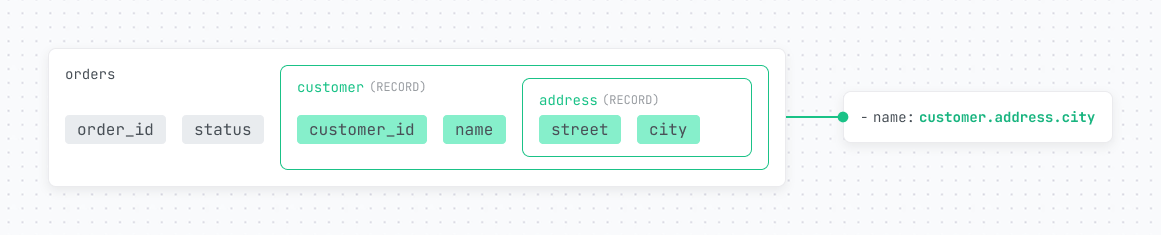 The `customer.address.city` dimension compiles to `` `orders`.customer.address.city `` and has the field ID `orders_customer__address__city`. Lightdash gets its type from the warehouse catalog, so `meta.dimension.type` is optional. An explicitly declared type takes precedence over the catalog type.
### REPEATED (ARRAY)
A repeated column with at least one listed leaf becomes a virtual table. In this `orders` model, `line_items.sku` becomes the `sku` dimension on `orders__line_items`. The `price` leaf is not exposed because it is not listed in YAML.
The `customer.address.city` dimension compiles to `` `orders`.customer.address.city `` and has the field ID `orders_customer__address__city`. Lightdash gets its type from the warehouse catalog, so `meta.dimension.type` is optional. An explicitly declared type takes precedence over the catalog type.
### REPEATED (ARRAY)
A repeated column with at least one listed leaf becomes a virtual table. In this `orders` model, `line_items.sku` becomes the `sku` dimension on `orders__line_items`. The `price` leaf is not exposed because it is not listed in YAML.
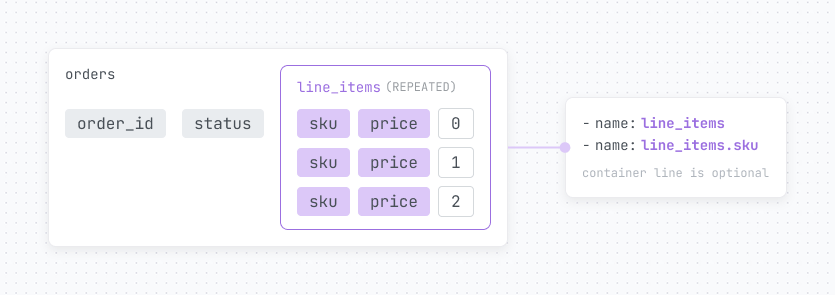 The `- name: line_items` container entry is optional. Include it when you want to set the virtual table's `description` or `meta.dimension.label`. Every virtual table also gets an `offset` dimension for the array position, so this example exposes `sku` and `offset` on `orders__line_items`.
## Define nested columns in YAML
Add one YAML entry for each leaf you want to expose. Use a dotted path that matches dbt-bigquery's column naming convention. Lightdash reads the warehouse catalog to determine whether each node in the path is a struct or an array; the YAML does not declare the container type.
Only leaves listed in YAML become fields. The diagrams above use a small `orders` model; the complete example below uses the public `bigquery-public-data.google_analytics_sample.ga_sessions_20170801` table to show a repeated record nested inside another repeated record. The table has one row per session:
```yaml dbt v1.10+ and Fusion theme={null}
models:
- name: ga_sessions
config:
meta:
primary_key: [fullVisitorId, visitId]
columns:
- name: fullVisitorId
- name: visitId
- name: date
config:
meta:
metrics:
session_count:
type: count
# STRUCT leaves: ordinary dotted dimensions on the model
- name: totals.pageviews
config:
meta:
metrics:
total_pageviews:
type: sum
- name: device.deviceCategory
# Optional container metadata for the ga_sessions__hits virtual table
- name: hits
description: One row per hit within the session
# Leaves below the REPEATED RECORD belong to ga_sessions__hits
- name: hits.hitNumber
config:
meta:
metrics:
hit_count:
type: count
- name: hits.page.pagePath
# Leaves below the nested REPEATED RECORD belong to ga_sessions__hits__product
- name: hits.product.productSKU
- name: hits.product.v2ProductName
- name: hits.product.productRevenue
config:
meta:
metrics:
total_product_revenue:
type: sum
```
```yaml dbt v1.9 and earlier theme={null}
models:
- name: ga_sessions
meta:
primary_key: [fullVisitorId, visitId]
columns:
- name: fullVisitorId
- name: visitId
- name: date
meta:
metrics:
session_count:
type: count
# STRUCT leaves: ordinary dotted dimensions on the model
- name: totals.pageviews
meta:
metrics:
total_pageviews:
type: sum
- name: device.deviceCategory
# Optional container metadata for the ga_sessions__hits virtual table
- name: hits
description: One row per hit within the session
# Leaves below the REPEATED RECORD belong to ga_sessions__hits
- name: hits.hitNumber
meta:
metrics:
hit_count:
type: count
- name: hits.page.pagePath
# Leaves below the nested REPEATED RECORD belong to ga_sessions__hits__product
- name: hits.product.productSKU
- name: hits.product.v2ProductName
- name: hits.product.productRevenue
meta:
metrics:
total_product_revenue:
type: sum
```
`lightdash generate` does not write container entries or entries below a repeated column, so add those entries by hand.
## Virtual tables
Each repeated column with at least one leaf listed in YAML becomes a virtual table in the Explore view. The virtual table is joined with `UNNEST`, and its leaves become the table's dimensions and metrics.
A leaf belongs to the virtual table of its deepest repeated ancestor. For example, `hits.page.pagePath` becomes the `page.pagePath` dimension on `ga_sessions__hits`. There is no nesting-depth limit: a repeated column inside another repeated column creates a chain of virtual tables.
### Names and field references
* **Table name:** `__`. Nested virtual-table names continue the chain, as in `ga_sessions__hits__product`. The separator is two underscores.
* **Sidebar label:** `: `. A nested label continues the chain, as in `Ga sessions: Hits: Product`.
* **Field ID:** `_`, as in `ga_sessions__hits__product_v2ProductName`.
* **YAML reference:** use the virtual-table name as the table prefix. For example, use `${ga_sessions__hits__product.productRevenue}` in metric SQL and `ga_sessions__hits__product.v2ProductName` in filters and pre-aggregates.
Every virtual table also has a number dimension named `offset`, which is the element's zero-based position in its array.
If a generated virtual-table name clashes with any other table in the Explore, that Explore fails to compile and the error names the conflicting table.
### Join behavior
Lightdash joins a virtual table with a left join and `ON TRUE`. The relationship is one-to-many, so a parent with an empty or `NULL` array keeps its row with `NULL` leaf values. A virtual table has no primary key and cannot declare one; its grain is the parent row multiplied by the array element.
When a model is joined into another Explore under an alias, or joined more than once, its virtual-table names and labels follow that alias. For example, aliases named `billing_customer` and `shipping_customer` produce `billing_customer__addresses` and `shipping_customer__addresses`.
## Generated SQL
For a query that selects `ga_sessions.date`, `hits.product.v2ProductName`, and the sum of `hits.product.productRevenue`, Lightdash generates two chained `UNNEST` joins:
```sql theme={null}
SELECT
`ga_sessions`.date AS `ga_sessions_date`,
`ga_sessions__hits__product`.v2ProductName AS `ga_sessions__hits__product_v2ProductName`,
SUM(`ga_sessions__hits__product`.productRevenue) AS `ga_sessions__hits__product_total_product_revenue`
FROM `my-project`.`analytics`.`ga_sessions` AS `ga_sessions`
LEFT OUTER JOIN UNNEST(`ga_sessions`.hits) AS `ga_sessions__hits` WITH OFFSET AS `ga_sessions__hits__offset`
ON TRUE
LEFT OUTER JOIN UNNEST(`ga_sessions__hits`.product) AS `ga_sessions__hits__product` WITH OFFSET AS `ga_sessions__hits__product__offset`
ON TRUE
GROUP BY 1, 2
```
## Query behavior and grain
The query grain follows the fields included in the query:
* A virtual table is joined only when one of its fields is selected, filtered, or sorted, just like any other joined table. If the query uses no repeated leaf, Lightdash does not add `UNNEST`, and the query stays at the model's grain.
* When the query uses a repeated leaf, the result has one row per array element.
* Metrics defined on the model pass through Lightdash's existing primary-key deduplication. They remain correct at element grain when the model declares a `primary_key`.
* Metrics defined on a repeated leaf are calculated at element grain.
* A filter on a repeated leaf is row-level and keeps only matching elements. It does not filter parents by whether any element matches.
* Grand totals in the results table drop dimensions. If a query's only repeated fields are dimensions, its grand total is calculated at model grain.
## Query warnings
The yellow icon next to **Run query** shows warnings about combinations that can inflate metrics.
* When two repeated columns that are not nested inside one another are selected together, Lightdash shows this warning once per query and only for the deepest virtual tables. A chain such as `hits` and `hits.product` does not trigger it:
> Repeated columns "ga\_sessions\_\_hits" and "ga\_sessions\_\_customDimensions" are unnested together, so each row pairs their elements and metrics can be inflated.
* When a metric on a virtual table is queried with a deeper or sibling unnest, Lightdash shows:
> Metric "Hit count" could be inflated by another unnested repeated column.
* The existing **could be inflated due to join relationships** warning still applies to model metrics that Lightdash cannot deduplicate, including metrics on a model without a `primary_key`.
## Pre-aggregates
Reference virtual-table fields with the virtual-table name as their table prefix:
```yaml dbt v1.10+ and Fusion theme={null}
models:
- name: ga_sessions
config:
meta:
pre_aggregates:
- name: ga_product_revenue
dimensions:
- ga_sessions__hits__product.v2ProductName
metrics:
- ga_sessions__hits__product.total_product_revenue
- ga_sessions__hits.hit_count
```
```yaml dbt v1.9 and earlier theme={null}
models:
- name: ga_sessions
meta:
pre_aggregates:
- name: ga_product_revenue
dimensions:
- ga_sessions__hits__product.v2ProductName
metrics:
- ga_sessions__hits__product.total_product_revenue
- ga_sessions__hits.hit_count
```
When a pre-aggregate's dimensions include a virtual-table field, include only metrics defined on virtual tables. A model metric that Lightdash normally deduplicates through its `primary_key`, such as a session count, is served incorrectly from that pre-aggregate at a coarser grain because the matcher treats it as additive. Serving at the pre-aggregate's own grain and serving additive metrics are correct. This limitation is tracked as ZAP-1022.
## Deploy and generate
Explores compile in the CLI during [`lightdash deploy`](/workflow/cli/deploy), and the CLI reads the nested-column setting from the Lightdash server. Use a CLI release that contains [PR #28718](https://github.com/lightdash/lightdash/pull/28718) or later. An older CLI, or a CLI that cannot reach the server, compiles with nested-column support disabled and silently drops repeated leaves from the Explore.
On self-hosted deployments, add `unnest-repeated-columns` to `LIGHTDASH_ENABLE_FEATURE_FLAGS`; see [Feature flags](/self-host/customize-deployment/environment-variables#feature-flags).
[`lightdash generate`](/workflow/cli/generate) does not generate an entry for a container column or any leaf below a repeated column. Add those entries to the generated YAML by hand.
## Known limitations
* Only BigQuery is supported. On another warehouse, the model fails to compile with an error that names the warehouse.
* Pre-aggregates have a [correctness limitation for model metrics at a coarser grain](#pre-aggregates).
* There is no parent-level containment filter, such as “sessions that contain product X,” that preserves the parent grain.
* You cannot access an element by index without unnesting, such as `hits[0].page.pagePath`. Define a dimension with custom `sql` instead.
* Selecting the struct or array container itself is not supported. Its cell displays JSON text, and CSV or Excel exports display `[object Object]`. Support for the underlying-data view on tables with nested columns is tracked as PROD-483.
* Selecting two repeated columns that are not nested inside one another multiplies their rows. See [Query warnings](#query-warnings).
* SQL Runner and virtual views type nested columns but do not expand them.
The `- name: line_items` container entry is optional. Include it when you want to set the virtual table's `description` or `meta.dimension.label`. Every virtual table also gets an `offset` dimension for the array position, so this example exposes `sku` and `offset` on `orders__line_items`.
## Define nested columns in YAML
Add one YAML entry for each leaf you want to expose. Use a dotted path that matches dbt-bigquery's column naming convention. Lightdash reads the warehouse catalog to determine whether each node in the path is a struct or an array; the YAML does not declare the container type.
Only leaves listed in YAML become fields. The diagrams above use a small `orders` model; the complete example below uses the public `bigquery-public-data.google_analytics_sample.ga_sessions_20170801` table to show a repeated record nested inside another repeated record. The table has one row per session:
```yaml dbt v1.10+ and Fusion theme={null}
models:
- name: ga_sessions
config:
meta:
primary_key: [fullVisitorId, visitId]
columns:
- name: fullVisitorId
- name: visitId
- name: date
config:
meta:
metrics:
session_count:
type: count
# STRUCT leaves: ordinary dotted dimensions on the model
- name: totals.pageviews
config:
meta:
metrics:
total_pageviews:
type: sum
- name: device.deviceCategory
# Optional container metadata for the ga_sessions__hits virtual table
- name: hits
description: One row per hit within the session
# Leaves below the REPEATED RECORD belong to ga_sessions__hits
- name: hits.hitNumber
config:
meta:
metrics:
hit_count:
type: count
- name: hits.page.pagePath
# Leaves below the nested REPEATED RECORD belong to ga_sessions__hits__product
- name: hits.product.productSKU
- name: hits.product.v2ProductName
- name: hits.product.productRevenue
config:
meta:
metrics:
total_product_revenue:
type: sum
```
```yaml dbt v1.9 and earlier theme={null}
models:
- name: ga_sessions
meta:
primary_key: [fullVisitorId, visitId]
columns:
- name: fullVisitorId
- name: visitId
- name: date
meta:
metrics:
session_count:
type: count
# STRUCT leaves: ordinary dotted dimensions on the model
- name: totals.pageviews
meta:
metrics:
total_pageviews:
type: sum
- name: device.deviceCategory
# Optional container metadata for the ga_sessions__hits virtual table
- name: hits
description: One row per hit within the session
# Leaves below the REPEATED RECORD belong to ga_sessions__hits
- name: hits.hitNumber
meta:
metrics:
hit_count:
type: count
- name: hits.page.pagePath
# Leaves below the nested REPEATED RECORD belong to ga_sessions__hits__product
- name: hits.product.productSKU
- name: hits.product.v2ProductName
- name: hits.product.productRevenue
meta:
metrics:
total_product_revenue:
type: sum
```
`lightdash generate` does not write container entries or entries below a repeated column, so add those entries by hand.
## Virtual tables
Each repeated column with at least one leaf listed in YAML becomes a virtual table in the Explore view. The virtual table is joined with `UNNEST`, and its leaves become the table's dimensions and metrics.
A leaf belongs to the virtual table of its deepest repeated ancestor. For example, `hits.page.pagePath` becomes the `page.pagePath` dimension on `ga_sessions__hits`. There is no nesting-depth limit: a repeated column inside another repeated column creates a chain of virtual tables.
### Names and field references
* **Table name:** `__`. Nested virtual-table names continue the chain, as in `ga_sessions__hits__product`. The separator is two underscores.
* **Sidebar label:** `: `. A nested label continues the chain, as in `Ga sessions: Hits: Product`.
* **Field ID:** `_`, as in `ga_sessions__hits__product_v2ProductName`.
* **YAML reference:** use the virtual-table name as the table prefix. For example, use `${ga_sessions__hits__product.productRevenue}` in metric SQL and `ga_sessions__hits__product.v2ProductName` in filters and pre-aggregates.
Every virtual table also has a number dimension named `offset`, which is the element's zero-based position in its array.
If a generated virtual-table name clashes with any other table in the Explore, that Explore fails to compile and the error names the conflicting table.
### Join behavior
Lightdash joins a virtual table with a left join and `ON TRUE`. The relationship is one-to-many, so a parent with an empty or `NULL` array keeps its row with `NULL` leaf values. A virtual table has no primary key and cannot declare one; its grain is the parent row multiplied by the array element.
When a model is joined into another Explore under an alias, or joined more than once, its virtual-table names and labels follow that alias. For example, aliases named `billing_customer` and `shipping_customer` produce `billing_customer__addresses` and `shipping_customer__addresses`.
## Generated SQL
For a query that selects `ga_sessions.date`, `hits.product.v2ProductName`, and the sum of `hits.product.productRevenue`, Lightdash generates two chained `UNNEST` joins:
```sql theme={null}
SELECT
`ga_sessions`.date AS `ga_sessions_date`,
`ga_sessions__hits__product`.v2ProductName AS `ga_sessions__hits__product_v2ProductName`,
SUM(`ga_sessions__hits__product`.productRevenue) AS `ga_sessions__hits__product_total_product_revenue`
FROM `my-project`.`analytics`.`ga_sessions` AS `ga_sessions`
LEFT OUTER JOIN UNNEST(`ga_sessions`.hits) AS `ga_sessions__hits` WITH OFFSET AS `ga_sessions__hits__offset`
ON TRUE
LEFT OUTER JOIN UNNEST(`ga_sessions__hits`.product) AS `ga_sessions__hits__product` WITH OFFSET AS `ga_sessions__hits__product__offset`
ON TRUE
GROUP BY 1, 2
```
## Query behavior and grain
The query grain follows the fields included in the query:
* A virtual table is joined only when one of its fields is selected, filtered, or sorted, just like any other joined table. If the query uses no repeated leaf, Lightdash does not add `UNNEST`, and the query stays at the model's grain.
* When the query uses a repeated leaf, the result has one row per array element.
* Metrics defined on the model pass through Lightdash's existing primary-key deduplication. They remain correct at element grain when the model declares a `primary_key`.
* Metrics defined on a repeated leaf are calculated at element grain.
* A filter on a repeated leaf is row-level and keeps only matching elements. It does not filter parents by whether any element matches.
* Grand totals in the results table drop dimensions. If a query's only repeated fields are dimensions, its grand total is calculated at model grain.
## Query warnings
The yellow icon next to **Run query** shows warnings about combinations that can inflate metrics.
* When two repeated columns that are not nested inside one another are selected together, Lightdash shows this warning once per query and only for the deepest virtual tables. A chain such as `hits` and `hits.product` does not trigger it:
> Repeated columns "ga\_sessions\_\_hits" and "ga\_sessions\_\_customDimensions" are unnested together, so each row pairs their elements and metrics can be inflated.
* When a metric on a virtual table is queried with a deeper or sibling unnest, Lightdash shows:
> Metric "Hit count" could be inflated by another unnested repeated column.
* The existing **could be inflated due to join relationships** warning still applies to model metrics that Lightdash cannot deduplicate, including metrics on a model without a `primary_key`.
## Pre-aggregates
Reference virtual-table fields with the virtual-table name as their table prefix:
```yaml dbt v1.10+ and Fusion theme={null}
models:
- name: ga_sessions
config:
meta:
pre_aggregates:
- name: ga_product_revenue
dimensions:
- ga_sessions__hits__product.v2ProductName
metrics:
- ga_sessions__hits__product.total_product_revenue
- ga_sessions__hits.hit_count
```
```yaml dbt v1.9 and earlier theme={null}
models:
- name: ga_sessions
meta:
pre_aggregates:
- name: ga_product_revenue
dimensions:
- ga_sessions__hits__product.v2ProductName
metrics:
- ga_sessions__hits__product.total_product_revenue
- ga_sessions__hits.hit_count
```
When a pre-aggregate's dimensions include a virtual-table field, include only metrics defined on virtual tables. A model metric that Lightdash normally deduplicates through its `primary_key`, such as a session count, is served incorrectly from that pre-aggregate at a coarser grain because the matcher treats it as additive. Serving at the pre-aggregate's own grain and serving additive metrics are correct. This limitation is tracked as ZAP-1022.
## Deploy and generate
Explores compile in the CLI during [`lightdash deploy`](/workflow/cli/deploy), and the CLI reads the nested-column setting from the Lightdash server. Use a CLI release that contains [PR #28718](https://github.com/lightdash/lightdash/pull/28718) or later. An older CLI, or a CLI that cannot reach the server, compiles with nested-column support disabled and silently drops repeated leaves from the Explore.
On self-hosted deployments, add `unnest-repeated-columns` to `LIGHTDASH_ENABLE_FEATURE_FLAGS`; see [Feature flags](/self-host/customize-deployment/environment-variables#feature-flags).
[`lightdash generate`](/workflow/cli/generate) does not generate an entry for a container column or any leaf below a repeated column. Add those entries to the generated YAML by hand.
## Known limitations
* Only BigQuery is supported. On another warehouse, the model fails to compile with an error that names the warehouse.
* Pre-aggregates have a [correctness limitation for model metrics at a coarser grain](#pre-aggregates).
* There is no parent-level containment filter, such as “sessions that contain product X,” that preserves the parent grain.
* You cannot access an element by index without unnesting, such as `hits[0].page.pagePath`. Define a dimension with custom `sql` instead.
* Selecting the struct or array container itself is not supported. Its cell displays JSON text, and CSV or Excel exports display `[object Object]`. Support for the underlying-data view on tables with nested columns is tracked as PROD-483.
* Selecting two repeated columns that are not nested inside one another multiplies their rows. See [Query warnings](#query-warnings).
* SQL Runner and virtual views type nested columns but do not expand them.